The 6790
6790 Overview
The 6790 should reflect the current E1MN phase that the client is in and the number of units (or 15-minute increments) that we anticipate that we will use during a given time frame.
6790s are only required for Waiver services.
Waiver services:
Employment Exploration Services (Engage Phase)
Employment Development Services – Plan (Plan Phase)
Employment Support Services (Keep Phase)
*Sometimes in very rare situations, Employment Development Services – Find (Find phase), but this is so very rare you should waste no brain space trying to remember this and your supervisor will alert you if this is a service we should request.

6790 Additional Information
The 6790 is the tool providers use to supply case managers with the information they need to complete authorizations for their clients to receive services from Great Work. The 6790 should reflect the current E1MN phase that the client is in and the number of units (or 15-minute increments) that we anticipate that we will use during a given time-frame.
6790s are only required for waiver services (to request additional VR services, you can just email the VR counselor). These are always unit-based (we work with/for someone for 15 minutes, and then we’re reimbursed for 15 minutes). Rates are set by State legislation.
Case managers authorize services. Waiver case mxanagers have the flexibility to create service agreements in the past or in the future (VR does not). Providers submit a 6790 to case managers to request the type and number of service units they need for an individual.
When we need more service units
Scenario: I am running out of ESS units and feel I need 250 more ESS units to get me to 12/31/2023.
Prior 6790 -> ESS 1/1/2023 – 12/31/2023
Unit amount: 500 unitsPreparing today a 6790 to request 250 additional units -> ESS 1/1/2023 – 12/31/2023
Unit amount: 750 unitsThe new 6790 has 750 units (500 +250) and uses the same start date.
When we need a different service
Scenario: My client completed EES today 1/1/2023, so tomorrow they will start EDSPlan 1/2/2023. <- Forwarding thinking is good.
Preparing today a 6790 to add EDS Plan: EDS Plan 1/2/2023 – 5/2/2023
Unit amount: 400 unitsThe CM will close the graduated unit (EES) the day before the new unit starts. So in this scenario, it will be closed on 1/1/2023.
Send your “Temp” request to Office Specialist:
Send an email to Office Specialist: “Temp Unit needed” in the heading
Full name of the client: Peter Participant
Service needed for the temp unit: EDS Plan
Start date of temp unit: 1/2/2023 (tomorrow)
Are we closing any prior service out? Yes, EES 1/1/2023 (today)
Was the 6790 sent: Yes
You don’t need a backdate. The backdate will need to be the start date on the 6790.
End dates can change on 6790s:
EDS Plan is 120 days. Questions to ask yourself: do you know the annual month? If not, write the 6790 using the full 120 days and the CM will correct it. Annuals Meeting Months will always break up the date span of any service line creating the need for two 6790s. If you know the Annual Meeting Month you can send both 6790s.
ESS will start when the unit is opened and goes to the last day in the “Annual Meeting Month.”
EES starts the date the unit is opened, but the end date never exceeds the last date of the “Annual Meeting Month.”
The start date will ALWAYS be the date you opened the temp unit with me that matches the date you provided on the 6790. <- They need to mirror each other. You are setting up a billing date span. Your logs in REV need to fall within that date span.
Prior to a person’s annual
An annual is the start of the client’s new funding year for their Waiver. Each client has a different funding start date. It is created when they are approved for their waiver service from the State of Minnesota.
Annuals date ranges go for an entire year: Example: 1/1/2023 – 12/31/2023 or another example: 4/1/2023 – 3/31/2024.
The Annual start will always be on the first day of the month and the end date will be on the last date of the month.
The end date of the Annual date range is the “Annual Meeting Month”. This is to renew a new Annual year of funding. The Start of the Annual year will start on the first day after the Annual Meeting Month.
Annuals End dates can break up your 6790. Reason: the funding year has come to an end and will renew the start of the next month.
A Service Authorization will stop on the last day in your client’s Annual Meeting Month. Service needs to be renewed with a new 6790.
Important Information: Services rendered must match the phase. We do NOT need a 6790 for VRS services.
6790 Email Template:
You send 6790s to case managers!
“Hello!
I’ve attached a 6790 for [INSERT NUMBER OF UNITS] units of [INSERT SERVICE NAME].
The start date for this 6790 is [INSERT START DATE] and the end date is [INSERT START DATE].
Let me know if you have any questions!
Thank you so much,”
6790 FAQs
-
The 6790 is the tool providers use to supply case managers with the information they need to complete authorizations for their clients to receive services from Great Work.
The 6790 should reflect the current E1MN phase that the client is in and the number of units (or 15-minute increments) that we anticipate that we will use during a given time-frame. The 6790’s are extremely important because it provides the case manager with essential information for setting up our contract and ensuring that we receive proper funding for the work that we do!
It is extremely important that the 6790’s are accurate and reflect the current goals that we are working on. If your client is changing phases, you must amend the 6790 before you do any work on the new phase. See “Amending the 6790” for more information.
MAKE SURE YOU SAVE ALL VERSIONS OF THE 6790 IN YOUR CLIENT’S FOLDER.
-
We create a new 6790 whenever we have an intake meeting or an annual meeting. This will be important to make sure we have a correct authorization for the service year.
We will amend the previous 6790 whenever we are changing authorizations or requesting additional units.
-
Units authorized can be tailored to each individual so it could be more of a conversation with a case manager about what they will authorize. These are just general guidelines.
Engage Phase – Employment Exploration Services
Standard Request: 4-6 hours per week. *More can be requested in special circumstances.
Indirect time (time spent working for an individual without their involvement) is factored into the request.
Plan Phase – Employment Development Plan Phase Services
Standard Request: 6 - 8 hours per week. *More can be requested in special circumstances.
Indirect time (time spent working for an individual without their involvement) is factored into the request.
Find Phase with VRS involvement
*The vast majority of Find phase clients will have VR involvement!Individual will be funded by an E1PBA and No 6790 needed!
Do not send a 6790 to a VR counselor (they’ll be confused by this!)
Nothing needs to be sent to the VR counselor to request units
Find Phase – Employment Development Find Phase Services *Only a very small fraction of your clients will be in WAIVER Find phase (no VR involvement)
Standard Request: 6 - 8 hours per week. *More can be requested in special circumstances.
Indirect time (time spent working for an individual without their involvement) is factored into the request.
Keep Phase – Employment Support Services
Standard Request: 4 - 6 hours per week. *More should be requested if services will be more intensive!
Indirect time (time spent working for an individual without their involvement) is factored into the request.
-
Our clients will frequently change their goals and we need our contracts to be accurate. Amending the 6790 will be able to clearly communicate to the case manager the total number of units that we need and the correct authorization. This will ensure that they are able to send over the correct contract for our work.
-
We will amend the previous 6790 whenever we are changing authorizations or requesting additional units.
-
Yes!
When we want to request additional units, we would want to include the previous units requested plus the additional units. For example, if we currently have 860 units of ESS, but we need an additional 15 units. We should send over an amended 6790 that includes the 860 previously requested units plus the 15 additional units for a total of 875 units (860+15=875 units).
-
Yes!
When an individual is changing services, we need to make sure that we include the previous authorization plus the new authorization. For example, if we currently have 543 units of EDS-Plan, but the client recently found a job and needs employment support instead. Then, we should send over a 6790 that includes:
The previous authorization of 543 units of EDS-Plan, ending on the day before they found a job
Plus, the additional authorization of “X” units of ESS beginning on the day they found the job.
-
Nope!
6790s are only required for waiver services (to request additional VR services, you can just email the VR counselor)
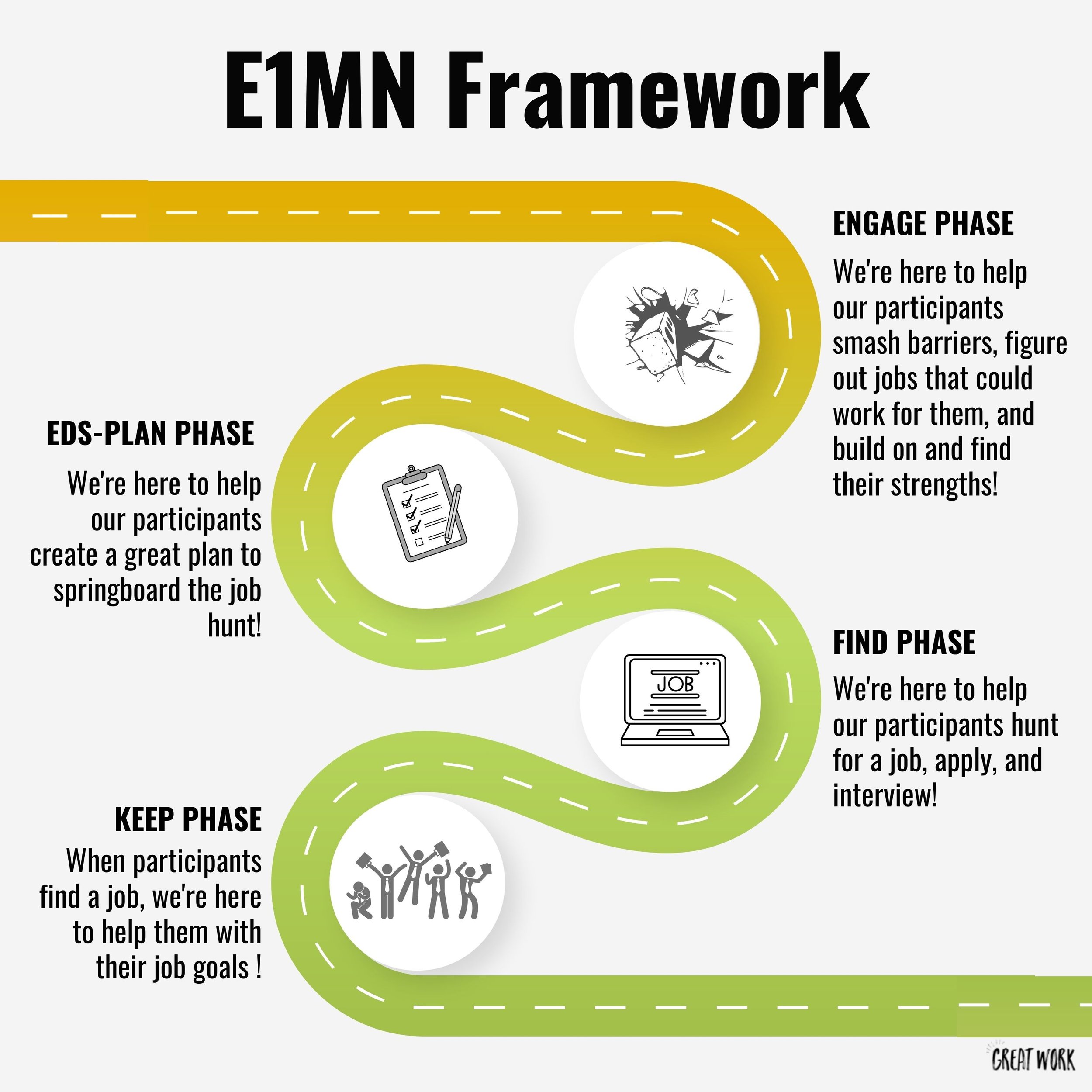
The E1MN Framework
The Employment First Minnesota Framework (E1MN) is designed to help make sure that Great Work helps our participants explore employment, plan for employment, find a job, and keep a job that is a perfect fit for them! Click below to learn more about each phase: